

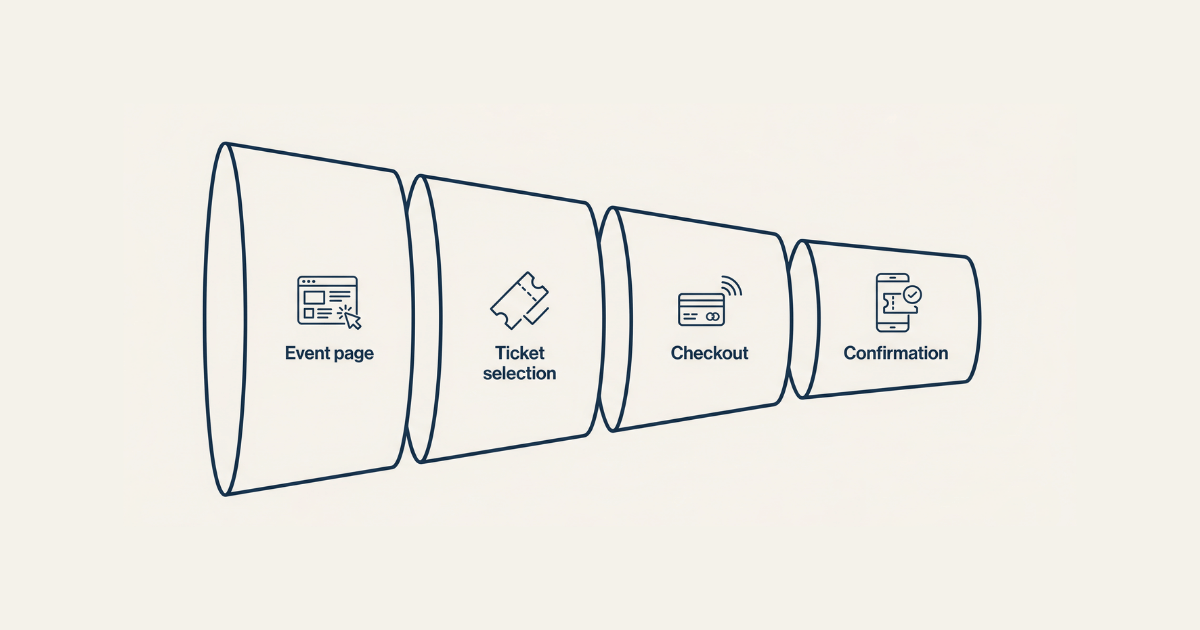
The hard part is done: people found your event and they’ve opened your page… then most of them left without buying. Often the cause isn’t the event itself but a small hurdle along the way: a surprise fee, a long form, a page that loads too slowly.
Your event ticket conversion rate shows how many visitors you’re losing.
This guide explains how to calculate it, how to break it down by funnel step, what a realistic target looks like, and 8 practical ways to turn more visitors into ticket buyers.
TABLE OF CONTENTS
What is an event ticket conversion rate?
The ticket conversion rate formula
Event ticket conversion rates to track
The steps of a ticket purchase funnel
What is a good event ticket conversion rate?
How to improve your event ticket conversion rate
Use urgency and scarcity honestly
Offer multiple payment options
Improve your ticket conversion rate with Fever
What is an event ticket conversion rate?
An event ticket conversion rate is the percentage of visitors who complete a ticket purchase. If 100 people land on your event page and three of them buy, your conversion rate is 3%.
It matters because it separates two problems that look identical on a sales report: not enough people finding your event, and not enough of them buying once they do. Marketing solves the first. Conversion solves the second, and it is usually the cheaper fix, because you are improving the traffic you already have.
The ticket conversion rate formula
Ticket conversion rate =
(completed ticket orders ÷ visitors) × 100
Count orders rather than tickets, so a group buying six seats counts once. Use the same definition of “visitor” (sessions or unique users) and the same time window every time you measure.

Example
An organizer runs a comedy show with several dates across the season. Over three weeks, the event page gets 80,000 visits and 3,200 orders go through.
3,200 ÷ 80,000 × 100 = 4%
Event ticket conversion rates to track
A single rate hides where buyers drop off. Before changing anything, break the purchase journey into steps and measure how many people make it from one step to the next.
The steps of a ticket purchase funnel
For simplicity, most online ticket purchases follow the same path:
- Event page view: the buyer lands on the event page.
- Ticket selection: they choose a date, session and ticket type, usually on the event page itself.
- Checkout: they review the order and add a payment method.
- Confirmation: the payment goes through and the order is confirmed.
Each intermediate conversion rate is the number of people who reach one step divided by the number who reached the step before it. To keep things simple, you can group them into three rates:

1. Add-to-cart rate
This is the number of people who select tickets and move on, divided by event page views. It is usually the biggest drop in the funnel, and the one organizers can influence most. When it is low, the cause is usually one of these:
- Traffic mix: campaigns attract the wrong audience, for example ads that promise something different from the event or click-bait creative.
- Content: the copy and images do not explain the experience clearly or make it appealing.
- Dates and sessions: the dates or times people want are sold out or not on offer.
- Pricing: the price does not match what visitors expected or what similar events charge.
2. Checkout rate
This is the number of people who reach the checkout screen divided by the number who added tickets to their cart.
It mostly measures the login step, and drops here usually come from forced account creation or long sign-up forms, since you’d be asking for information that is irrelevant or that could otherwise be extracted implicitly from the social login methods (more on this below), or asked post-purchase as an optional or mandatory field.
For reasons such as all these, the checkout rate is where many ticketing platforms fail.
3. Payment completion rate
This is the number of completed orders divided by the number of people who reached checkout. A low rate here means people wanted to buy and something stopped them, such as unexpected fees, a missing payment method, or a payment error.
These last two steps depend largely on your ticketing platform, so if you’re evaluating a switch to another ticketing platform, choose one with a proven checkout:
- Local payment methods, shown to each buyer based on where they are paying from (more on this below).
- Smart payment routing, which sends each transaction to the processor most likely to approve it and retries through another if it fails.
- Machine-learning fraud detection that blocks fraudulent orders without declining legitimate buyers.
- Merchant-of-record coverage, where the platform processes payments and absorbs fraud-related chargebacks, so you don’t carry that risk or need your own payment setup.
Together, these keep authorization rates high: the less fraud you process and the better each payment is routed, the more transactions card issuers approve.

Conversion rate by channel
This is the number of orders divided by sessions from each source: email, social, paid ads, organic search, and partner referrals. It is usually tracked with UTM parameters on a last-click basis, meaning each order is credited to the source of the session in which it was placed.
Channels convert very differently because they bring visitors with different levels of intent. Organic search, Google Search campaigns, and paid social remarketing usually convert better, because those visitors are already looking for an event like yours or have shown interest before. Paid social prospecting and email campaigns to large, unqualified databases usually convert less.
Additionally, a lower last-click conversion rate doesn’t necessarily mean a channel isn’t working. Paid social prospecting rarely closes the sale, but it introduces your event to people who later buy through search or remarketing. Last-click gives those later channels all the credit, so prospecting looks like wasted spend.
A blended average hides these differences, and last-click reporting distorts them, so both can send your budget to the wrong place. Tag every campaign link with UTM parameters so each channel can be traced from click to order, and choose an event ticketing platform whose attribution goes beyond the last click: one that credits every channel in the path to purchase and shows which ones actually drive incremental sales.
What is a good event ticket conversion rate?
The rate you should expect depends mainly on the type of event and on how far along its sales cycle it is. The same event can convert very differently in launch week and in opening week.
By type of event
One-off events, such as a concert or a music festival, sell toward a single date. Recurring, non-permanent events, such as a touring exhibition or a seasonal show, sell sessions across several weeks or months. Permanent attractions sell all year round. Each follows its own sales curve, so compare an event with similar events rather than with one industry average.
By sales stage
For a recurring, non-permanent event, conversion usually moves through these stages:
- Presale and sales launch: conversion peaks, driven by the most motivated buyers.
- Before opening: conversion dips once the first wave of demand has bought.
- Opening: conversion climbs in the run-up to opening and peaks in opening week.
- After opening: conversion gradually declines.
- Final weeks: conversion rises again as fear of missing out kicks in before closing.
One-off events follow a simpler curve: high at launch, a valley in the middle of the sales period, and a steady climb toward event day.
Factor these stages into your event marketing strategy, and plan marketing moments for the valley periods (new date announcements, limited-time offers, press coverage, or content that gives people a reason to buy now) to keep conversion from dropping too far.

Track your rate week by week and compare it with the same stage of similar events. A dip before opening is normal; the same dip in closing week deserves a closer look.
How to improve your event ticket conversion rate
These eight changes tackle the friction points that most often cost organizers sales. They follow the order of the purchase funnel, from the event page to payment, so start with the ones that match your weakest step.

Think mobile first
A large share of ticket buyers (around 90%+) will arrive on a phone, often from a social post or a message from a friend. Design the purchase for the small screen first: large tap targets, a ticket selector visible without scrolling, autofill on forms, and digital wallets at payment. Then test the full journey on a real phone, from the first tap to the confirmation.
Few ticketing platforms do this well, so ensure yours is up to par on mobile readiness.
Have a dedicated event page
Give every event its own page with everything a buyer needs to decide: date, venue, price, what is included, and a clear call to action. Avoid sending people to a general listing, and put the ticket selector on the event page itself. Keep seating simple, too. If you sell reserved seating by zone and buyers do not choose specific seats, skip the seating map: let them pick a zone and assign the best seat available (BSA) automatically. Every extra decision is another moment to hesitate.

Fever places the ticket selector directly inside event pages.
Improve page load speed
Slow pages lose buyers before they even see the ticket selector. Research suggests that load times of 0 to 3 seconds for mobile, and 0 to 1 second for desktop, are best for conversion. Compress images, limit third-party scripts, and test the page on a mobile connection, not just Wi-Fi.
 Loading speed for Fever listings.
Add social proof
People buy when others do. Show real signals: reviews and user-generated photos from past attendees, ratings, or quotes and press mentions. Place them next to the ticket selector, not at the bottom of the page where few people scroll.
 Reviews with photos from past attendees show an event’s appeal.
Use urgency and scarcity honestly
Urgency works when it is true. Real signals include limited capacity, early bird prices with a genuine end date, low-availability notices tied to actual inventory, and sold-out dates and sessions that stay visible on the event page instead of being hidden.
A good waitlist and presale event strategy helps too: it builds demand before tickets go on sale and gives your launch a strong start. Fake countdown timers and invented “only 2 left” messages erode trust, and buyers notice. If demand is real, show it. If it is not, use an honest deadline instead.
Reduce clicks to purchase
Count the steps between choosing tickets and paying, then remove any that do not earn their place. Pre-select the most popular ticket option, skip unnecessary upsell screens, and combine steps where you can. Every extra screen is another chance to lose the buyer. Much of this depends on your ticketing platform, so choose one whose purchase flow has been tested at scale.
Collect data after purchase
Every extra form field before payment costs you conversions, so ask only for what you need to issue the ticket and move everything else to after the sale. Social login methods, such as signing in with Google or Apple, can fill in much of the data organizers usually ask for, like name and email, without the buyer typing anything.
After payment, you can have optional or mandatory post-booking questions depending on the data you wish to gather, such as access needs (like mobility or dietary restrictions), waiver signatures, personally identifiable information, etc. You still get the data you need for future campaigns, without adding friction at the moment of purchase.
Offer multiple payment options
Cards alone are not enough. Add digital wallets such as Apple Pay and Google Pay, plus any local methods your audience expects. For higher-priced tickets, consider a buy now, pay later option. Use a ticketing platform that remembers the payment method of returning buyers, so their next purchase takes a couple of taps. The fewer details a buyer has to type, the faster they finish.
Improve your ticket conversion rate with Fever
Fever is the leading global ticketing and events platform, and it is built to improve the number this guide is about: the share of visitors who go on to buy. It pairs professional ticketing software with access to a large audience of experience seekers, so you can work on conversion and on reach in the same place.

On the conversion side, the platform covers many of the tips above:
- SEO- and GEO-optimized listings. Event pages are built to rank in search engines and AI answers, so people already looking for an experience like yours can find it.
- Localized listings. Multi-language event pages and AI-powered translations make it easier to convert international visitors.
- Mobile-first event pages. Pages are designed around mobile UX and UI, so buyers on a phone can choose tickets and pay without friction.
- Flexible pricing and promotions. Use fixed, tiered, or dynamic pricing, plus promotions and rules by channel or ticket type, so offers and urgency reflect real availability.
- Real-time capacity. Inventory and prices stay in sync across your website, box office, partners, and resellers, so buyers only see tickets that are actually available. Timed entry and automatic release of new sessions keep high-demand events moving.
- Abandoned cart emails and remarketing. Automated emails bring back buyers who left before paying, and you can build audiences of users who reached any step of the funnel for remarketing campaigns.
- Flexible seating. Sell general admission or reserved seating, and use best seat available (BSA) assignment when buyers do not need to pick a specific seat on a map.
In short, Fever’s checkout is a proven purchase funnel that has been optimized across 200,000+ experiences, with thousands of funnel variations A/B tested by event type and region. That frees you to focus on content, pricing, and date availability, with insights and benchmarks from the Fever team.
 Fever’s conversion funnel.
Beyond your own traffic, events can be listed on Fever’s marketplace, which reaches millions of experience seekers in 500+ major cities. More qualified visitors on your event page means every improvement to your conversion rate is worth more.
Ready to turn more visitors into ticket buyers? Book a demo and see how Fever can work for your events.
Related articles
All articles →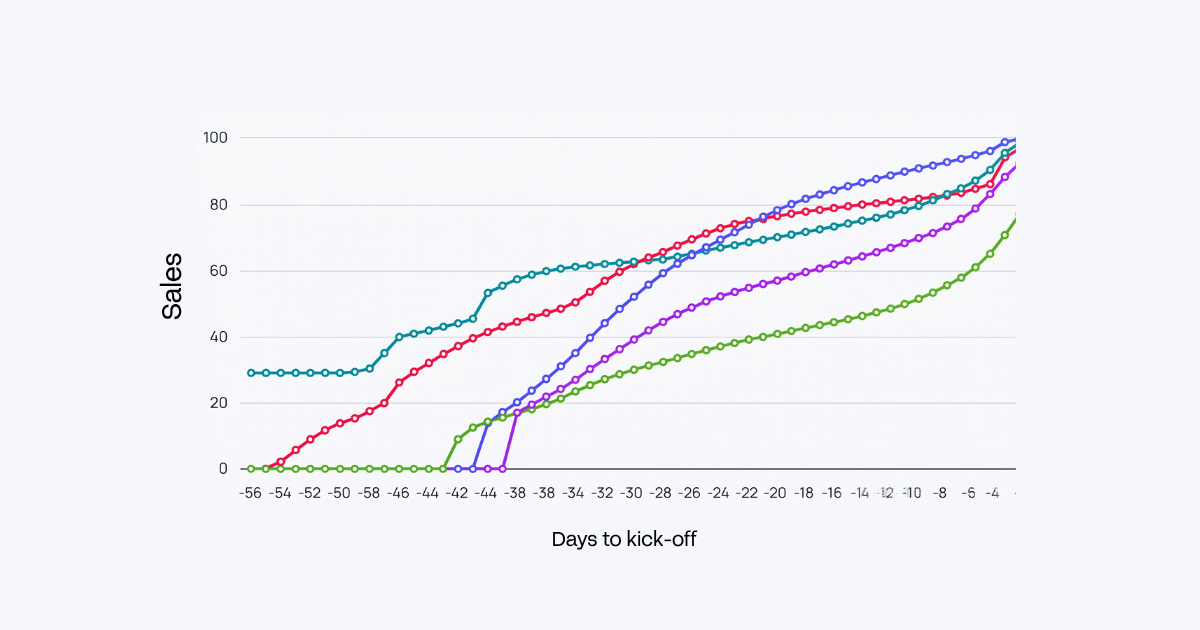
Maximize revenue with event ticket pricing strategies
A guide to building an effective event ticket pricing strategy covering both core and psychological pricing st…
How event dynamic pricing is the proven strategy for tickets in 2027
Learn how event dynamic pricing works for live event tickets, what data drives it, and how organizers use it t…
Event ticketing platforms: 6 capabilities to evaluate before switching
Comparing event ticketing platforms? See which capabilities actually move revenue, from dynamic pricing to rea…